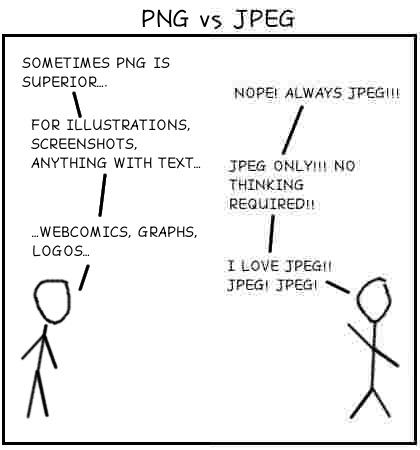
My First and Last Webcomic
xkcd style…
JPEG isn’t always right. If you are one of those people who just assumes JPEGs rule the world and make all images JPEG, please stop. There is a time and a place where you have to put the JPEG encoder down. It’s not a silver bullet.
I’ve seen a whole slew of web comics using JPEGs. Not good. Sometimes I see things by supposed technology websites that make me want to cry. Seems to me that if you are using the web to publish things, you should know what you are doing. You should care about making them look correct. Maybe they have their reasons. Maybe they want to save to bandwidth while making their graphics look trashy.
Maybe no one notices but me.

October 15th, 2008 at 9:05 am
Hi Louis–I like reading your ‘essays’. Check out Sam’s website too–http://www.towtoday.com/.
Also, I don’t understand most of what you are talking about here, but it makes me feel like I am certainly increasing my computer quotient (CQ) (I just made that up, but I like it–you should start asking people what their CQ is).
October 24th, 2008 at 2:04 pm
It’s not that nobody notices but you.
It’s just that nobody thinks it’s such a big deal as you do.
Webcomics are every bit as much about ideas as they are about graphics. You’re paying too much attention to the wrapper – and not enough attention to the Twinkie!
October 27th, 2008 at 1:15 pm
I notice, and it drives me nuts as well. I love the reaction I get when suggesting to use a GIF file in an entirely appropriate situation and just get the response: “Didn’t GIF’s get replaced by JPEG a long time ago, come on.” @Jennifer has a good point, but it doesn’t mean that this will stop driving me (and you) nuts.
October 27th, 2008 at 5:00 pm
“Webcomics are every bit as much about ideas as they are about graphics. You’re paying too much attention to the wrapper – and not enough attention to the Twinkie!
”
Hey, webcomics need to look good, also. If people didn’t care about how an webcomic looks like, we would be reading webcomicss that use only stick figu–
Oh, wait…
October 27th, 2008 at 9:00 pm
I notice all the time. I have a problem that’s almost the opposite: unfortunately, most of my co-workers (at a medical diagnostic imaging) equate \compression\ with \jpeg\. So if I show them a png, they immediately assume that there are compression artifacts and are unwilling to look at the images.
October 29th, 2008 at 4:43 pm
I think it’s as big of a deal as you do. I encode everything that can be represented with a limited color palette in a PNG with as few colors in the palette as possible. Usually the image is smaller than if it were encoded with JPEG. So yes, bandwidth would be saved, and pages would load faster.
November 2nd, 2008 at 11:30 am
@Brian Cain
They’re right to be paranoid about making a diagnosis based on a lossy image, but it sounds like you could just teach them the difference between lossy compression (JPEG) and lossless compression (PNG).
November 12th, 2008 at 7:28 am
Put me in the ‘driven nuts’ category too! I just can’t bear to see it (after seeing your graphic, I had to go and have a lie down!
) But it’s all about using the right tool for the job – what’s wrong with saving as a GIF or an 8-bit PNG? Do the people that save these images actually LOOK at what they produce?
Please, anyone that does this, please just TRY saving as a GIF!!
November 12th, 2008 at 8:05 am
Agree!
I’m often telling people they should not use JPEG for this and that purpose. And yes, lots of them just think of JPEG as the format for everything.
In many drawings with few colors PNG produces better quality and smaller file size. I found myself sometimes converting those JPEGs to PNGs and manually removing all that noise and repainting areas with solid colors to produce a decent size PNG.
Also, even at high quality quantization, JPEG normally applies color subsampling that ruins color detail (like red or green lines or other saturated drawings).
November 12th, 2008 at 9:18 am
Wow… the use of JPEGs really bothers you that much? Pity this is your last comic. I would have loved to see the one about Anal-Retentiveness.
November 12th, 2008 at 9:30 am
A more subtle example of poor jpeg compression/use is the fox news logo in the upper-left hand corner of their site.
Now – the whole site is hideous – but they should at least get their logo right.
I think it comes down to people paying attention to details or not. At work, I’m also the aspect-ratio police. People resize images all the time without maintaining proper aspect-ratio and it drives me nuts.
November 12th, 2008 at 9:36 am
JPEGs are for photographs and realistic images. PNGs are for line art, text-heavy images, and images with few colors. GIFs are just fail.
November 12th, 2008 at 9:36 am
Well-illustrated! I hate seeing nasty, grimy JPEG artifacts unless it’s being used for aesthetic character, or to make a point like this.
A general rule of thumb I keep in mind is: PNG is better at compressing with flat areas of color, JPEG is for gradients and photorealism. Of course, testing with specific image content shows what’s right in a given situation!
November 12th, 2008 at 9:49 am
I definitely notice, and it drives me crazy just like you. That tournament bracket you linked is hard to read, and should be PNG instead.
Ah well, at least I do this stuff correctly on my own site, even if others don’t.
November 12th, 2008 at 10:02 am
Great webcomic!
I agree with you–the rule of thumb is not that hard–PNGs are very versatile and are the better choice in most occasions, except for photos.
November 12th, 2008 at 10:02 am
I use the JPEG-test to weed out bad girlfriend candidates (or regular friends for that matter). Do they have the decency of producing good looking JPEGs then they are good girlfriend material. It implies quite much, stuff that I care about. Sense of beauty, attention to detail, pride in their own work and tech savviness.
It can be while reading blogs, Facebook, MySpace looking at Flickr pages, and if you ask them for a photo.
If they use PNG while that’s appropriate, It’s so much better of course.
For people who doesn’t understand when to use JPEGs, try to remember what the P in JPEG stands for.. Photographic.
November 12th, 2008 at 10:04 am
The funny part is that serving that PNG file is hurting my web server. It isn’t compressed very well because of the JPG artifacts. Ha.
November 12th, 2008 at 10:11 am
No, you are an idiot too. That image is 65 Kilobytes. Optipng can reduce that to 25 Kilobytes with a laugh.
You could at least have greyscaled it (33 Kilobytes, 23 after optipng). Or set the palette to 64 colours (19 Kilobytes).
And you wonder why people think PNG is bloated and JPEG just fine…
November 12th, 2008 at 10:16 am
Strong.
There’s no better example of PNG efficiency !
November 12th, 2008 at 10:19 am
Why call it alt text when you correctly have it as the title attribute?
November 12th, 2008 at 10:23 am
I notice. Thank God…. I thought I was crazy.
November 12th, 2008 at 10:24 am
Louis, actually it’s barely compressed period, no relation with the JPG artifacts, I guess you produced it with Photoshop CS1 or CS2 tops, w/o using Save for Web.
Simply dropping the file into PNG Optimizer (http://psydk.org/PngOptimizer.php) (without doing anything else) I get a 63% reduction in file size (from 66773 to 25245 bytes)… for essentially 0 effort.
If I run it through PNGOut after that (slightly more involved) I save a further 612 bytes (down to 24633), a second post-PNGOut run through PNGOptimizer evenh manages to shave off a further 170 bytes (down to 24463 bytes)
In other words, without any effort your image is 2.64 times too big, and with a tiny bit of effort (a few seconds) we can get something 2.73 times smaller.
November 12th, 2008 at 10:25 am
Hahaha. You fuckers are all over it!
Yes, it’s the “title” tag because that’s what wordpress wanted to do. I can fix it if you want
And yes the PNG was bloated because I wasn’t expecting a huge spike of traffic nor #1 on reddit. I tweaked apache and it was running fine. I’ve gone ahead and optimized the png too. It’s 23kb now.
(edited to add: it was made in 9 seconds with gimp and my super elite line drawing skills)
November 12th, 2008 at 10:34 am
Just so you know, your png web comic took 40 seconds to load.
November 12th, 2008 at 10:37 am
I didn’t notice right away the text (and stickman) in the comic, the text of the png guy is readable and sharp but the jpg guy is fuzzy and jagged.
November 12th, 2008 at 10:41 am
I do ad and web production and I use png’s all the time, but really the only main difference I see is that png’s allow alpha’s (which is pretty huge in my field). But when I put stuff up on the web I use nearly uncompressed jpeg’s whenever I can. The reason not being that I want to lower my bandwidth, but rather that a lot of my clients still use DSL (or even dial up sometimes) and it means a lot to those people to have their website load up quickly. If you don’t need an alpha a high quality jpeg won’t show any signs of loss and will be much smaller.
So I guess that’s why I’d use a jpeg over a png when possible…though I think what you’re complaining about isn’t the format, but just it being overly compressed. I do use png’s all the way up to the point where I put the stuff on the web though.
November 12th, 2008 at 10:41 am
Oh, I see it now that dhughes mentioned it. I thought it was just complete crap.
He should have just stuck two images, one png one jpg, right next to each other so it gives the illusion of one single panel. Also, the filesize would be much smaller in total, because using png to capture jpg artifacts makes stupid people like JPGfanboi confused.
November 12th, 2008 at 10:48 am
I do high-resolution print advertising. The worst is when a customer sends me the logo for their ad as a 60×90 pixel JPG and then wonders why I have to charge them to re-draw their logo.
November 12th, 2008 at 11:05 am
I haven’t used IE in a long time but last time I checked It had little to no support for PNG. Now I know most of you out there may say “just get firefox” but believe it or not some people actually like to use internet explorer. I since bought a mac and cant get any newer version of IE on it so I can’t confirm with the newer versions.
But that fact alone is why I think PNG hasn’t caught on as an image format for web.
November 12th, 2008 at 11:18 am
You’re not alone. I always make every image I save a PNG and avoid JPG like the plague!
November 12th, 2008 at 11:19 am
@pat : IE has had support for displaying PNG images since version 4.0b1. You may be thinking of alpha transparency support, which became “fully” supported in IE 7.0b1.
November 12th, 2008 at 11:42 am
Neat to see something on PNG. Here is a venerable page on making GIFS small as possible.
Bandwidth conservation Society.
Still useful even after a dozen years.
http://www.blackpearlcomputing.com/bpc/Bandwidth_stuff/default.html
November 12th, 2008 at 12:17 pm
I’m a web developer. I love PNGs. However they are big. Sometimes MUCH bigger than a JPEG. You have to consider optimization too.
So while I agree people need to start using PNGs wherever possible and reasonable, file size is important too.
November 12th, 2008 at 12:34 pm
And it would have been even smaller (and for a monochrome image lossless) as a GIF
November 12th, 2008 at 12:38 pm
@Jesse, Ben: PNG can be smaller than JPEG in some cases, depends on the image and on how you optimize it.
-If there’s no color switch to grayscale.
-Don’t use an alpha channel unless necessary
-Don’t use 24-bit RGB unless necessary: logos and line art look OK in pallete-based 8-bit or less. Convert it and compare.
-Count your colors and adjust bits-per-pixel (color depth): if you have 10 colors use 4 bits, if it is pure black and white like a fax use 1 bit per pixel.
-Don’t use dithering (floyd-steinberg or others) unless you need it because of color gradients. Flat color logos don’t need that
-use a PNG optimizer if you have one
-if it’s a photograph go for JPEG
(if using JPEG, consider disabing color subsampling if you have fine details of saturated color like lines or text superimposed)
November 12th, 2008 at 12:41 pm
I see it all the time. And it is really annoying!
November 12th, 2008 at 12:50 pm
Funny, I took your png, saved it to my hard disk, opened it, and saved it back out as a jpg at 50% quality. Then opened the resulting jpeg. No death by artifact.
The moral: When you jpeg compress 90% lossy, ANYTHING is going to look like crap.
November 12th, 2008 at 12:59 pm
We evaluated PNG compression over at Penny Arcade. While XKCD-style comics compress well in the PNG format, we found (through very informal testing) that most of our comics retained readability and compressed better as JPGs. That said, most of our site design elements are saved as PNGs.
November 12th, 2008 at 1:16 pm
Geeks
November 12th, 2008 at 1:16 pm
The important point here isn’t really the technical merits of PNG vs JPG (or lossless jpeg or GIF) but knowing what it is your are doing. The entire purpose of this post was to point out that the slavish automatic “save as jpeg” mentality is wrong.
The trade-offs exist. If you are making an informed decision about your image formats, that’s a different story altogether.
And yes, the artifacts in my example are over the top because I was trying to make a point. The example from TechCrunch shows more accurately what happens when you just mindlessly hit “save as jpg”.
November 12th, 2008 at 2:16 pm
Did anybody mention how much of a pain it is to get PNG’s to display properly in Explorer? F***kin Microsoft!
November 12th, 2008 at 2:16 pm
Too true. I usuall use PNG for pretty much anything that shows information cause it shows the true colours, not some blocky crap XD
November 12th, 2008 at 2:25 pm
> While XKCD-style comics compress well in the PNG format, we found (through very informal testing) that most of our comics retained readability and compressed better as JPGs.
Probably due to the background, I note that the latest PA comic has a very noisy background for example, PNG is not going to survive that kind of things.
> Did anybody mention how much of a pain it is to get PNG’s to display properly in Explorer?
It’s not. There are only two things you need to do to get PNGs (note: the apostrophe doesn’t mean “OH SHIT HERE COMES AN S”) to display properly in MSIE:
* Don’t use the alpha channel (which doesn’t apply to IE7 and above)
* Remove the gAMA chunk (which any PNG optimizer worth using — PNGOut, PNGCrush, PNGOptimizer — automatically removes unless you ask to keep it)
That’s it, just follow these rules and PNGs will display just as well as everything else.
November 12th, 2008 at 2:41 pm
GIF = JPEG = Loser.
A true computer professional knows that web pages and documents should use Line Drawings as GIF or PNG files and Photos as JPEG files.
I can always tell a newby when a person stores a Line Drawing in a lossy file format.
To all you idiots that store Line Drawings in JPEG file format, quit doing it, it makes you look like an idiot!
November 12th, 2008 at 3:16 pm
I agree jpeg’s are not always the answer. And there are fixes out there to help out with older browsers (IE6 I’m looking at you) render the ping correctly.
November 12th, 2008 at 3:18 pm
I’ve been a Professional Graphic Designer for about 11 years. File Formating has no secret File PNG or JPEG. It comes down to your Resolution or DPI [Dots Per Inch] and Pixels Widths. These are the things that make your type readable or pixelated.
November 12th, 2008 at 3:25 pm
Heres a trick for you.
Upload a 300 DPI image to the Web.
A 2 x 2 – 300 DPI image on the web shows up 10 x 10
A 10 x 10 – 72 DPI image on the shows up 10 x 10
That 300 DPI well retain a higher quality of line and cleaner type. Good luck out there.
November 12th, 2008 at 3:49 pm
What are .bmp for?
November 12th, 2008 at 4:59 pm
@Jonra- I certainly hope no one pays you money to design anything for the web. The fact that you left units off your 2×2 and 10×10 references indicates you don’t understand the fundamental relationships at play here.
Here’s a clue. For the web you work with pixels. DPI is meaningless until you actually print something (or until they release resolution independent interfaces as is rumoured for Mac OS 10.6).
Also, if you don’t see the difference between JPG and PNG in the comic then you have a terrible eye and shouldn’t be doing graphic design at all period.
November 12th, 2008 at 5:12 pm
@Milicent: To my knowledge, .bmps are used mainly for graphics in operating systems and the like. It’s astoundingly inefficient to use them on the web because the files are MASSIVE and offer no practical advantages whatsoever over something like PNG.
November 12th, 2008 at 5:42 pm
IE’s rendering of transparent PNGs is hosed. That really limits my usage, although I agree PNG is bitchin.
November 12th, 2008 at 6:12 pm
I use png sometimes but gif can usually take it’s place. Ahh funny no matter nice.
November 12th, 2008 at 6:22 pm
I use PNGs to utilize alpha channels when animating in flash.
It’s a GODSEND!
November 12th, 2008 at 6:25 pm
@Jonra – Sorry, but your “professional graphic designer” declaration isn’t fooling anyone here, because frankly, and listen carefully now, you have absolutely no idea whatsoever what you are talking about. Period. Hate to break it to ya, but I’m sure you suspected it yourself from the get-go. Not exactly sure why you thought it would actually stand up to scrutiny. Do some research on the formats, on resolution, and perhaps on the nature of digital imagine itself, and we’ll all be better for it.
I’m not writing this to flame you, but rather to make sure that nobody actually listens to your completely bunk and worthless “advice,” and also partly to refute your absurdly smug attitude about your very wrong beliefs.
Folks, don’t listen to jonra. Learn for yourself how graphics work.
November 12th, 2008 at 6:54 pm
JPG: Joint Photographics Experts Group (Photo is the keyword here) JPEG was developed for compression on images such as photographs, where the variance between pixels is above a certain threshold. This visual variation works well with the algorithms of JPEG, where the visual artifacts of lossy compression are more difficult to distinguish among the field of variance. Knows nothing of “Alpha Channels”, or transparency.
GIF: Graphics Interchange Format: Different compression algorithm from JPEG, lending itself to images where there is little variance from pixel to pixel. The beauty of GIF compression is in images where there are 40+ ^2 pixel areas of solid or relatively solid color. Supports transparency and multi-frame images (think animation).
TIFF: Tagged Image File Format: Orginally a One-bit format, geared toward scanners and desktop publishing applications in a time where line art and B&W art ruled, and the images presented as TIFF out-scaled the Desktop five-fold, pixel-for-pixel.
PNG: Portable Network Graphics: PNG is a modern, lossless image compression mechanism. PNG supports Alpha Channels (transparency), gamma correction (think color correct across many displays), 16-bit color, etc.
Like the JPEG zealot in the cartoon, please do not be a PNG head. There’s a time and a place. PNGs are large. PNGs are needy. PNG is not a silver bullet, either.
November 12th, 2008 at 7:14 pm
I have noticed this problem for more than a decade. Even before PNGs were widely accepted, many times a GIF would have sufficed better than a JPEG.
Seeing artifacts on sharp, discrete web graphics makes me cry inside.
At night.
And in the day, too.
November 12th, 2008 at 7:25 pm
Also, Jonra, if you haven’t learned after 11 years that what you just said makes absolutely no sense at all … I hope you have a pretty face.
http://en.wikipedia.org/wiki/Dots_per_inch#DPI_measurement_in_video_resolution
Also, assuming you’re using inches in your measurements, a 2×2 inch image at 300 DPI will show up ‘on the web’ at 600×600 pixels. A 10×10 inch image at 72 DPI will show up at 720×720 pixels. How large this actually appears on the screen depends entirely on the screen’s size and current resolution. In your example, the 72 DPI image contains more detail, NOT the 300 DPI one, since the 72 DPI image has a higher pixel count. THAT, not purely the DPI number, is what leads to ‘higher quality of line and cleaner type’.
Sorry, but that irked me. Like JPEG artifacts.
November 12th, 2008 at 7:26 pm
Come on man, that “example” you gave obviously was from what someone made in Paint. The Paint BMP to JPG converter is absolute trash, it isn’t a true same of JPG quality.
November 12th, 2008 at 7:52 pm
Nonsense. The example I gave was made in GIMP and what came out has absolutely nothing to do with the quality of the “converter”. It was a function of the level of compression I used. And yes, I turned the compression up to make the point.
If you think the comparison was “dishonest” and that you just need to jack up the quality and that JPEG fits all situations, you are the guy on the right. That type of image is simply not what JPEG compression was meant for.
November 12th, 2008 at 7:58 pm
If you want to compare the two then compare them … the image above is a single png image that doesn’t even seem to be using alpha transparency where you’ll notice an issue in regards to browser support … many images on the internet use jpg files and they work just fine. png files are great for “true” transparency over .gif images.
November 12th, 2008 at 8:01 pm
I’m kind of amazed how many of you literally don’t get it. There is nothing wrong with the example. The image is a PNG because a PNG is the correct format for the point I am trying to make. It’s a “fair” way to show you both formats in a single image. I could give you the source JPG and it would look exactly like the right-half of the PNG above. That’s the entire of point PNG.
You guys seem to think that the only different between PNG and JPG is the transparency. You couldn’t be more wrong.
November 12th, 2008 at 8:14 pm
Welp, I’ve noticed no/littler difference.
I use Jpeg for print/digital painting, png for carrying transparency into non-Adobe software. Imo, it boils down to both depending on the situation.
Then again, I’m a Media Arts student-not graphics.
November 12th, 2008 at 8:36 pm
PNG is not a JPEG substitute.
For web purposes where every byte counts, photographic and continuous tone images are still best saved as JPEGs.
November 12th, 2008 at 9:18 pm
Oh man… I work at CrunchGear, part of the TC network. This shit pisses me off so bad! I try to maintain standards with these guys but it’s like you say, there are people even at top levels of websites who can’t do any html at all, who can’t embed a video, and so on. In TechCrunch’s defense, those guys are more industry commentators and not actually familiar with the nitty gritty stuff like image compression techniques. I’m scrupulous with mine, though, whenever I can be (I just wrote up a bang & olufsen mp3 thing that had horrible compression on their site’s product shots).
November 12th, 2008 at 9:20 pm
I haven’t seen a crappy looking JPEG for over ten years. Your example may apply to the internet of 1996, but not so much now.
November 12th, 2008 at 9:27 pm
I can completely relate louis. I have been saying this for years, but some people (as you have witnessed in your comment section) just don’t get it.
In many cases, PNG actually results in a smaller file size than a similar JPEG image set at a reasonable compression quality anyway.
And people, Louis is not saying PNG should be used in ALL situations. He is saying that it should be used when appropriate to avoid making you look like a moron and to make your graphic look clear and professional.
Photos/complex graphics on the web: use JPEG.
Most other graphics on the web: use GIF or PNG, depending on the situation.
November 12th, 2008 at 9:34 pm
Man, I can’t believe all the comments on your post. It’s funny that I saw this tonight because I was telling someone at work today how she should use a png instead of her jpeg and she looked at me like i had 2 heads. I’ll show her this example tomorrow
November 12th, 2008 at 9:37 pm
boggle @ethan,
It’s not like there has been some tremendous advance in JPEG technology since 1996. It’s the same standard. Bandwidth has increased so people have turned up the quality.
As far as a bad JPG, I provided one from TechCrunch from a few months back. I suppose you could argue that particular jpeg doesn’t look bad. I think it looks terrible.
@devin,
I know TechCrunch is more journalists than technologists. They make an easy target. Originally, I had a bunch of (non-established) web comics picked out to use as evidence but decided against picking on them. I felt safer (and nicer) picker on a gigantic money making machine like TC.
@daniel,
Exactly. The point has always been that there are images that are better as JPEGs and others that are betters as PNG (and still others GIF). If you think any image format is a silver bullet, you are wrong.
November 12th, 2008 at 9:40 pm
Heh, thanks for the laugh.
November 12th, 2008 at 10:07 pm
For that comic, a 4-bit gif would have been more efficient.
November 12th, 2008 at 10:13 pm
JPEGs suck, whoever says their good is clueless
November 12th, 2008 at 10:36 pm
hahaha, this is a great comic. I’m still a fan of jpegs for most work though, but pngs over gifs anytime for transparency!
November 12th, 2008 at 10:47 pm
That’s right, PNG is the way to go! Great job!
November 12th, 2008 at 10:52 pm
I prefer BMPs. kwality is way better.
November 12th, 2008 at 11:10 pm
PNG is fantastic for transparency and rendering text.
JPG good for photos.
I just hate designing with logos in small JPG, it’s a joke, well the most frustrating joke. Some client’s do not even have digital copies of their logos unless they waste a ton of time finding their original branding people.
I am about to deal with two logos from a client. He says he has digital, but I feel I will be scanning a catalog have to de-screen it. Sometimes this makes me cry, and clients do not understand why they have to pay more to make things look better because of redrawing etc.
What ever happened to clients supplying the content to the client? The proper content not understanding why most of what they give you is crap.
Am I bitching too much??
p
November 12th, 2008 at 11:20 pm
ftw
November 12th, 2008 at 11:32 pm
I notice all the details.
It makes me wonder if a lot people notice stuff like that as well. I have noticed coworkers even trashing aspect ratios when editing images….and they didn’t notice! :O
Even when the resolution on their monitor wasn’t native! It should be a crime!
November 12th, 2008 at 11:37 pm
could be expanded to included vector based formats for when an image needs to scale like a number of the people with a printing background are mentioning.
November 13th, 2008 at 12:39 am
One of my buddies sent this as a laugh, and I whipped this up as a joke back for him, http://68.230.99.144:8090/images/jpg_vs_png_vs_gif.gif
just thought I’d share (yes I know it’s the wrong font and such, and I really do enjoy using png)
November 13th, 2008 at 1:20 am
honestly, i think it’s time we start adopting PNG for everything as the standard so that we can stop basing our internet on lossy compression. look at youtube, listen to a song on myspace, etc. we have accepted shittiness on our internet. we’re going to look back on these times and laugh at JPEGs.
November 13th, 2008 at 1:30 am
i saved this image as jpeg
November 13th, 2008 at 2:21 am
In many cases SVG would be better than either – if only IE supported it natively.
November 13th, 2008 at 2:53 am
Personally I like to use Targa with the intention of destroying bandwidth. RAWR!
November 13th, 2008 at 3:10 am
PNG all the way. I’ve been using it for ages.
November 13th, 2008 at 3:14 am
12k reduction:
http://img136.imageshack.us/img136/7866/smalleryl9.png
November 13th, 2008 at 3:27 am
jpegs and pngs are for f**king noobs… go vector..
down with photoshop… UP WITH ILLUSTRATOR!!!
November 13th, 2008 at 3:41 am
It is amazing how many people post comments showing that they did not understand the point of the post, that they do not know the difference between jpeg and png/gif, and that they did not read the previous comments. -.-
Yes, it bothers me all the time. Receiving low quality jpg-files for logos… *shudder*
PNG = lossless; great for “illustration-style” images (for screen, not print). (In photoshop, use save for web, not save as, to get decent compression.) Supports transparency (1-bit, or alpha).
JPEG = lossy; great for “photographic” images. Do not use too low compression. Looses quality every time it is opened and saved again – even at max quality. (so; ideally you never edit a jpg)
Opened and saved JPG (RGB) at max quality 10 times and the quality was visibly degraded even at 300 ppi print!
TIFF with LZW compression = what we use for lossless images at work – when working for print (we save about 50% space on average). A bit larger than png, but supports more stuff (but not transparency, then we go psd). Opens/saves faster than png (compress a huge photograph with png and it’s dead slow).
I see posts like that by Jonra all the time, where even “graphics/designer” people have no clue what “dpi” is (they mean “ppi”, but I say “dpi” by mistake all the time too). The ppi value stored with images is just an arbitrary value saying how large you _intend_ to print it… if it is 1 ppi or 9999 ppi, a 300×300px image is still the exact same size on screen and contains the exact same amount of information/quality. And if you change the size of the image (scaling/Transforming) in the print dialogue or in a page layout program, the effective ppi on the print no longer matches that in the file (in other words: it does not matter).
That said, InDesign do use the ppi in the file to calculate the size for the low-quality on-screen previews, but that’s about it. So if you use 1 ppi in the file, indesign will generate a larger (and slower) preview. Won’t affect the final output though.
Also, it’s funny how people say images for screen must be 72 ppi when that is just a “random” number that has no effect (actually, my monitor is about 96 pixels per inch).
ok… /rant.
November 13th, 2008 at 3:57 am
I <3 PNG
November 13th, 2008 at 4:02 am
I would just like to say that when i do a hand stand i always wear green boxers. I mean really….green is the only color you should wear when you are on your hands. But yeah….jpegs are pretty good, especially if you put a little salt, pepper, and lime juice on it. MMMMMMMMM!!!
November 13th, 2008 at 4:04 am
@Dave
PNG was suppose to replace the GIF, not JPEG :p
November 13th, 2008 at 4:23 am
LOL at the alt text
November 13th, 2008 at 4:34 am
i love png’s, saves me size and gives me quality.
November 13th, 2008 at 4:59 am
LOLs at everyone saying ‘use PNG! JPEG FAIL! GIF FAIL!’ in this thread.
Square graphics PNG is great, but with any transparency nightmare in IE6 (yes people still use that pile of crap…sigh) as it adds a blue box without really annoying CSS/script hacks. And PNGs especially 24 bit ones are LARGE.
And do mobile browsers all support PNGs now?
For that reason GIFs and JPEGS can be safer and more compatible. PNGs I tend to use more now on non-IE 6 sites, or as graphics without transparency – but still too large for any of the banners I do.
November 13th, 2008 at 5:18 am
Clever.
November 13th, 2008 at 6:16 am
I tend to shudder the same way about unaliased edges, especially in transparency by a single palette color instead of an alpha channel. PNG is a really good format covering many needs, also that.
November 13th, 2008 at 6:32 am
For all you know, I noticed it! I use various image formats for different purposes. JPEG is more use for photo and image-realistic compression, PNG and more for fine-art and line-art. In addition, PNG can also be used for alpha background, which is pretty cool.
However, even with JPEG and PNG, you should never forget the good times of GIF, the one and only image format that supports animation. Beside, GIF is also useful for some other purposes too.
November 13th, 2008 at 7:52 am
Thanks for this. Now I have a link to provide to people, instead of lecturing on the deficiencies of JPG.
November 13th, 2008 at 8:30 am
Still, not all web browsers properly support PNG and IE6 is still around 25% of my web traffic
November 13th, 2008 at 9:26 am
your image is png. shouldnt you have at least loaded side by side panels in both formats. so making a crappy right side of your png image should prove your point though right? such a lame waste of time. lame enough for a comment
November 13th, 2008 at 9:40 am
Facepalm. Yes. My image is a PNG. And no, I didn’t need to make two versions, one JPG and one PNG. What I did is perfectly correct for the point I was trying to make. If you don’t understand why, take that as a hint that you need to read the comments of various people who have explained the advantages of PNG for certain types of images.
@cprossu, http://68.230.99.144:8090/images/jpg_vs_png_vs_gif.gif made me laugh
November 13th, 2008 at 9:42 am
JPEG rules for high-speed computers.
November 13th, 2008 at 10:29 am
It drives me nuts when someone’s logo background color is slightly different color than your website background. Calibrate your monitor sometime…
November 13th, 2008 at 10:29 am
This bothers me a lot. I think it is a big deal because no matter what others say we all know we judge things by the cover. The internet is fast enough that people can have PNG images on their sites.
November 13th, 2008 at 11:52 am
Seriously are you guys really even debating this? If the image looks good and the site it is on performs in a speedy manner, who really cares what format it is other than a few of you geeks with nothing better to do than nit-pick like an old grandma! I got three words for all of you “GET A LIFE!”
November 13th, 2008 at 1:11 pm
Try as I might to keep up to date with tech, I am afraid I am a dinosaur dreaming of being a chicken. Strike that, a chicken with a flag.
I did learn something new here today though. Thanks.
November 13th, 2008 at 4:19 pm
The 90s glow effect on this site’s logo goes well with the 90s jpeg artifacts shown in this post’s image.
November 13th, 2008 at 5:10 pm
You’re not alone. I always make every image I save a PNG and avoid JPG like the plague!
November 13th, 2008 at 5:25 pm
I agree that my header has what we in the business might refer to as “major issues”. Making the header “non-sucky” has been on my to-do list since I launched.
November 13th, 2008 at 5:45 pm
One of the many beauties of Linux has been the introduction of the PNG…I have yet to EVER find a PNG to be of lesser quality (and compatibility) than a JPG. Those things need to die already!
November 13th, 2008 at 7:30 pm
Clever comic, those who agree will probably catch the visual (artifact) differences between Mr. JPG and Mr. PNG in your comic.
If the world adopted JPEG 2000 we might be able to satisfy all parties, and get a standard way to trade images with 16-bit color component resolution to boot! The Adobe DNG doesn’t do it ’cause it’s just a wrapper around RAW. Of course, this would require monitors with 256x the dynamic range of those we use today and video adapters with at least 4x the video memory. Not to mention 64-bit Windows (or Linux) as the norm along with 1 Terabyte disks and screen resolutions on the order of 4096×4096. Where will it all end!?
November 14th, 2008 at 12:40 pm
its not necessary to start saving everything as gif from now on just because of this article.
u need to understand when to save an image as jpg or gif.
a very simple point to remember while making the decision would that if the image contains a gradient colour then save it as jpg and if the image contains plain colours that are well defined and don’t contain gradients then simply save it as gif.
also if the image contains text then save it as gif. the text will be clear and crisp not like the one in the cartoon image above.
November 14th, 2008 at 1:15 pm
Ja pierdole ale wiara ma problemy. Co kogo obchodzi rozszerzenie, ważne by dobra jakość pic była xD, reszte pizgać. Ale jak ktoś kurwa chce się sapać o bzdety to sory żal ;P…łoł koment w końcu po polsku i na dodatek mój^^…Polska kocham ten kraj pomimo wszystko<3. Pzdr 4 all ;]
November 14th, 2008 at 5:00 pm
yo era una de las personas que pensaba asi tambien, no mas jpeg
November 15th, 2008 at 1:15 am
For a similar example in a situation where lossy wasn’t good enough, I had to fight my boss to get him to return our business cards when the printer had converted my psd (appropriate layers as vector) to something lossy (I’ll just assume jpg). I eventually had to find another company’s card to show him that their text didn’t look like dirt.
Is it anal? Yes. Is it part of not looking like idiots? Yes.
November 15th, 2008 at 1:57 pm
Yeah, crappy jpegs drive me buggy also. Save it as a high quality jpeg if you simply MUST save as jpeg, or save it as a png, or else don’t publish it at all, because those artifacts scream incompetence.
November 17th, 2008 at 1:41 am
How true. I also favor PNG over JPEG. But sometimes, PNG images are quite huge (over 10 times that of JPEG) in which case I opt for JPEG.
November 17th, 2008 at 7:35 am
rkms, the game isn’t over when you’ve chosen PNG; if your PNGs are too big, you can also check you’ve got an appropriate color depth. 24 bits, or even 36 bits per pixel are frequently used for drawings that have hardly any colors in them, or sometimes are just black and white!
Louis here has used eight bits, which is much better; 256 colors is easily enough to show the shades of gray. It’s also possible in some photo utilities to select 16 or even fewer colors, but fewer than 16 grays would have washed out the full horror of the JPEG artifacts. Of course, that’s usually a feature not a bug
November 18th, 2008 at 10:55 pm
Holy crap this is so good. A week ago the professor in charge of my project told me to completely switch to jpeg. I have been using png for technical graphs and diagrams and it was really annoying.
November 19th, 2008 at 4:26 am
yup, i went right for the alt text.
November 21st, 2008 at 10:38 am
PNG FTW!
December 17th, 2008 at 9:41 pm
Sometimes .jpg is still the safest choice, considering jpg images are usually smaller and require less effort to tweak them down in size (unlike png’s).
I do agree png’s are better though.
January 8th, 2009 at 8:24 am
This is awesome! I’m just a beginner at web design and didn’t know how to get transparent PNGs to work in IE6, the browser most of my site visitors will likely be using. Thank you so much for this easy-to-use script.
March 9th, 2009 at 5:14 am
I agree with you 100%! I’m a big supporter of the PNG File Format.
A properly saved Jpeg can work just fine but most people don’t allow for enough quality; PNG works a lot better. Especially if there aren’t a lot of colors in the comics; PNG-8 would be a great, small and lossless alternative.
One day they’ll understand . . .
April 5th, 2009 at 3:44 pm
I am a HUGE fan of PNG files…especially when I need a transparency….it is way better than a GIF.
May 11th, 2009 at 6:07 pm
Well whether your comic is in png or jpeg, its still gonna look like crap
July 12th, 2009 at 10:28 am
brilliant
July 13th, 2009 at 8:38 am
I use jpegs for my comic pages and the text never looks like that. They look clear and crisp.
August 24th, 2009 at 4:48 pm
I think these comments just goes to show that there are a few people that know and a massive number of people who think they know.
August 26th, 2009 at 12:21 pm
I use pngs to utilize alpha channels when animating in flash.but all the album pics are jpegs.
August 31st, 2009 at 11:32 pm
I thought GIF > PNG for images that contains less than 16 colors. But def. PNG for comics and the like. It’s crisp! Woo, I love PNG. Mostly because Paint can save as PNG (but not JPEG without losing 99% of the quality).
September 14th, 2009 at 2:23 am
the browser most of my site visitors will likely be using. Thank you so much for this easy-to-use script.
September 26th, 2009 at 6:49 am
Nice comic. Do you mind if we use it on the PNG website?
Glenn Randers-Pehrson
libpng, pngcrush, PNG/MNG/JNG specs
October 29th, 2009 at 7:50 pm
Cute comic. Caused by repeated frustration, no doubt.
I think the main reason everyone saves as a JPEG is simply because of how widely accepted the format is. Also people are lazy and tired all the time from the 2-3 jobs we all have to have now just to pay the bills.
In fact, that’s the reason I usually use lossless JPEG as an end-all format. Sure, lossless makes it huge, and tons of images would work better as PNGs by that format, efficiency wise. But as long as it still looks nice, clean, readable, and artifact free, I don’t care how long it takes to download, and I know everyone will be able to view it, even if they’re using Windows 3.1. Or Macintosh ‘System 7′ (Anyone remember that?)
Either way though, I’m with you that people shouldn’t just save everything as a 30% quality JPEG, but let’s face it, people are dumb. People still think it’s magic that I can make animated GIFs. Seriously.
January 22nd, 2010 at 8:45 am
Both are cute formats.It implies quite much, stuff that I care about. Sense of beauty, attention to detail, pride in their own work and tech savviness.
January 25th, 2010 at 5:00 am
Thanks for these formats.
April 16th, 2010 at 11:25 am
The file format used in web comics only matters to other artists.
The rest of us slobs could give a shit, we are just looking for some good writing.
Christ, look at XKCD, its one of the best comics out there and its freaking stick figures, not even all that well drawn.
May 10th, 2010 at 1:43 pm
you should stop using fucking MS paint to encode jpegs
July 13th, 2010 at 3:59 am
A lot of casual web builders adopt a rule of thumb: “Save everything as a JPEG” or “save everything as a PNG.” Wrong! PNG is good for one kind of image and JPEG is good for another, and you’ll almost never find an image that will do just as well in PNG and JPEG. You can ruin an image and waste hours of work if you make the wrong choice, and most of the time there’s no way to undo the damage.